Whats Web+ Dual Chat Messenger1.8
Publisher Description
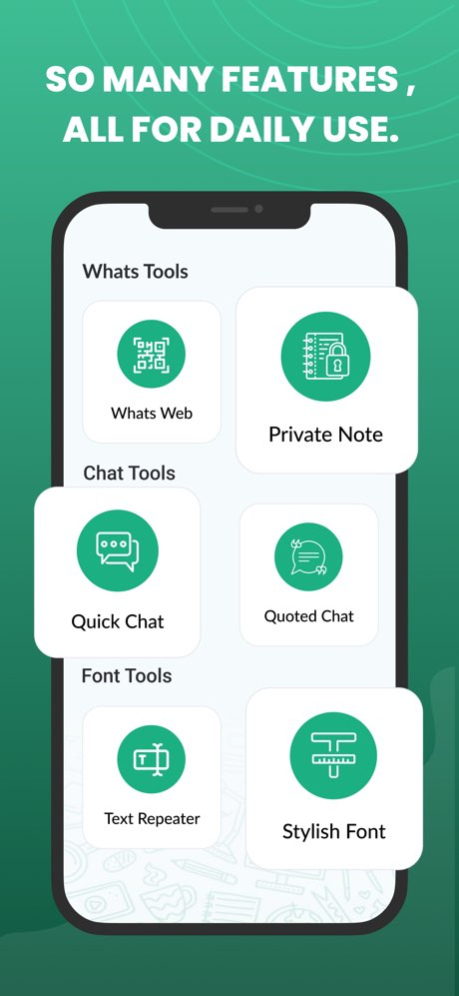


====================
#1 Best App for Pro Chat & Text !
====================
Introducing Whats Direct: Pro Chat & Text, the ultimate iOS app that takes your experience to the next level. With a wide array of additional features and powerful tools, this app enhances your capabilities and allows you to do so much more with the world's most popular messaging platform. Whats Direct: Pro Chat & Text is here to revolutionise your chat experience.
Your phone have to connected to internet and you must scan qr code in phone to use Whats Direct: Pro Chat & Text.
1. Easiest way to connect, protect conversation and set chat reminder.
Fast and light weighted app to connect Whats web in your iPad.
2. You can chat with another user anonymously. No need to login, just enter a nickname and start chatting.
++ Highlights ++
* Now make list of dream days like birthday , anniversary etc..
* Whats Web App is the all-in-one messenger for SMS, voice messaging, emojis, privacy and customisation.
* Now don't miss to chat someone.
* Use chat reminder Feature of App.
* Scan QR code to connect whats web.
* Support almost every feature provided by whats web.
* Make your messages to More stylish
* Sent Best Quotes to your friends, family and relatives.
* Find Country code easily
* Save Your Personal Notes and sent anytime
The best and most convenient app to use on iPhone or iPad.
Dialer for Whats elevates your messaging experience by allowing the use without the hassle of adding unknown numbers to your contacts. Tired of cluttering your contact list with one-time contacts? We've got you covered!
Disclaimer:
This is an UNOFFICIAL tool for WhatsApp Messenger.
We are NOT affiliated, associated, authorized, endorsed by, or in any way officially connected with WhatsApp LLC, or any of its subsidiaries or affiliates. Usage falls within guidelines of "fair use".
Version History - Sent Unlimited Messages
- Repet text Unlimited Time
- Sent Unlimited Quotes
- Use Unlimited Fonts 1.8 Jan 5 - Sent Unlimited Messages
- Repet text Unlimited Time
- Sent Unlimited Quotes
- Use Unlimited Fonts 1.7 02/19/2025 - Sent Unlimited Messages
- Repet text Unlimited Time
- Sent Unlimited Quotes
- Use Unlimited Fonts 1.6 02/18/2025 - Sent Unlimited Messages
- Repet text Unlimited Time
- Sent Unlimited Quotes
- Use Unlimited Fonts 1.5 02/10/2025 - Sent Unlimited Messages
- Repet text Unlimited Time
- Sent Unlimited Quotes
- Use Unlimited Fonts 1.4 02/06/2025 - Improve User Interface
- Bug fixed
- Use app Much better 1.3 11/06/2024 - Improve User Interface
- Bug fixed
- Use app Much better 1.2 09/17/2024 - Improve User Interface
- Bug fixed
- Use app Much better 1.1 09/04/2024 1.0 08/03/2024
About Whats Web+ Dual Chat Messenger
The company that develops Whats Web+ Dual Chat Messenger is Keyur Kyada. The latest version released by its developer is 1.8.
To install Whats Web+ Dual Chat Messenger on your iOS device, just click the green Continue To App button above to start the installation process. The app is listed on our website since 2026-10-13 and was downloaded 1 times. We have already checked if the download link is safe, however for your own protection we recommend that you scan the downloaded app with your antivirus. Your antivirus may detect the Whats Web+ Dual Chat Messenger as malware if the download link is broken.
How to install Whats Web+ Dual Chat Messenger on your iOS device:
- Click on the Continue To App button on our website. This will redirect you to the App Store.
- Once the Whats Web+ Dual Chat Messenger is shown in the iTunes listing of your iOS device, you can start its download and installation. Tap on the GET button to the right of the app to start downloading it.
- If you are not logged-in the iOS appstore app, you'll be prompted for your your Apple ID and/or password.
- After Whats Web+ Dual Chat Messenger is downloaded, you'll see an INSTALL button to the right. Tap on it to start the actual installation of the iOS app.
- Once installation is finished you can tap on the OPEN button to start it. Its icon will also be added to your device home screen.
Program Details
System requirements
Download information
Pricing
Version History
version 1.8
posted on 2026-10-13
Version History - Sent Unlimited Messages
- Repet text Unlimited Time
- Sent Unlimited Quotes
- Use Unlimited Fonts 1.8 Jan 5 - Sent Unlimited Messages
- Repet text Unlimited Time
- Sent Unlimited Quotes
- Use Unlimited Fonts 1.7 02/19/2025 - Sent Unlimited Messages
- Repet text Unlimited Time
- Sent Unlimited Quotes
- Use Unlimited Fonts 1.6 02/18/2025 - Sent Unlimited Messages
- Repet text Unlimited Time
- Sent Unlimited Quotes
- Use Unlimited Fonts 1.5 02/10/2025 - Sent Unlimited Messages
- Repet text Unlimited Time
- Sent Unlimited Quotes
- Use Unlimited Fonts 1.4 02/06/2025 - Improve User Interface
- Bug fixed
- Use app Much better 1.3 11/06/2024 - Improve User Interface
- Bug fixed
- Use app Much better 1.2 09/17/2024 - Improve User Interface
- Bug fixed
- Use app Much better 1.1 09/04/2024 1.0 08/03/2024
version 1.8
posted on 2026-01-05
- Sent Unlimited Messages
- Repet text Unlimited Time
- Sent Unlimited Quotes
- Use Unlimited Fonts
